Is Your Password Really Secure? Three Questions Every Business Should Ask
You lock your office at the end of the day. You lock your vehicle. But what about the digital keys to your business?
Passwords are often the first line of defence against cybercriminals, yet weak or reused passwords remain one of the easiest ways for attackers to gain access to sensitive information. The good news? Strengthening your passwords doesn’t have to be complicated.
Here are three questions to ask yourself.
1. Is Your Password Long Enough?
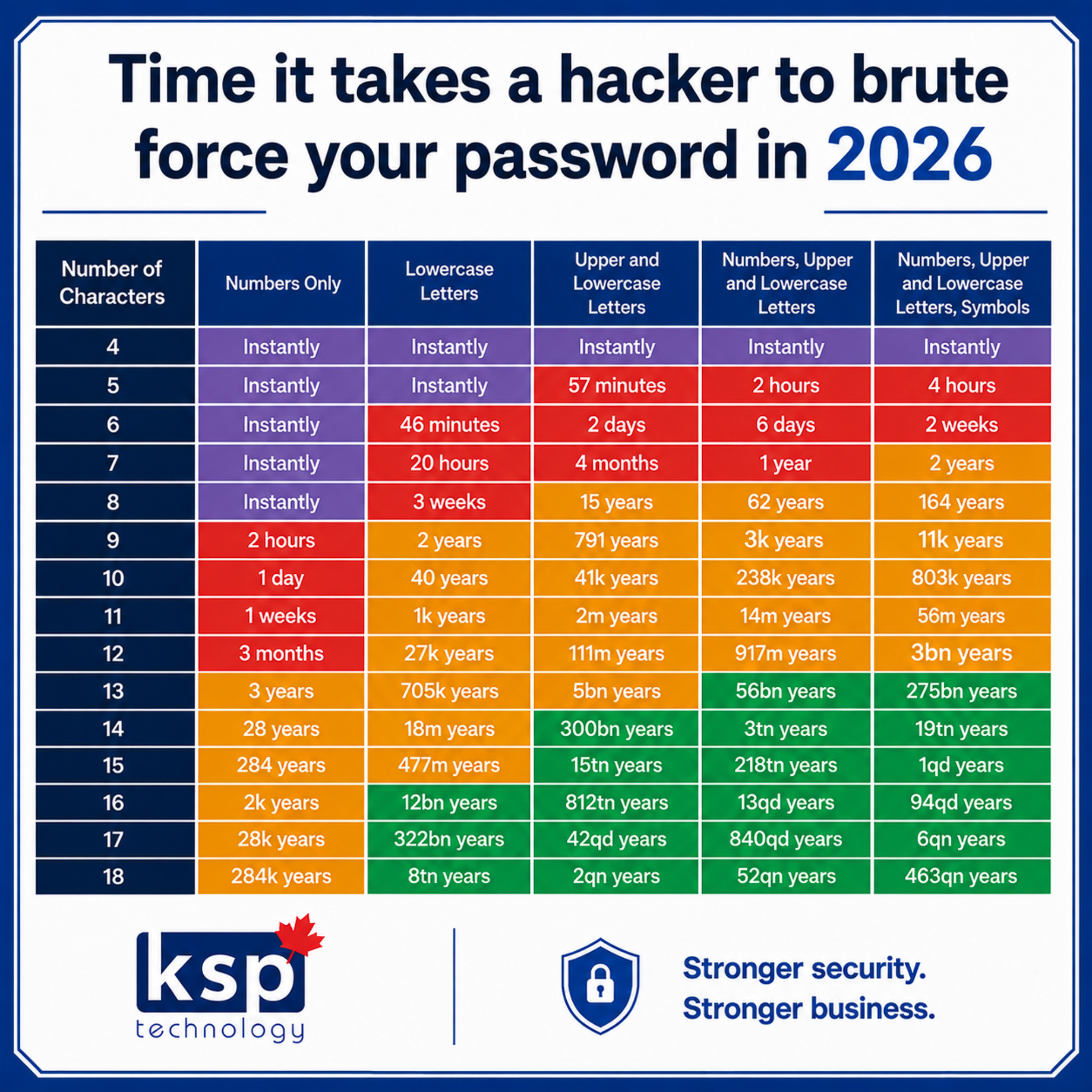
When it comes to passwords, length matters. A password that’s 16 or more characters long is significantly harder to crack than one with only eight characters, even if both include numbers and symbols.
Instead of trying to remember something like: P@ssw0rd! Try using a passphrase that’s unique to you, such as:
BlueCoffeeRunsAtSunrise!
Longer passwords are easier to remember and much more difficult for attackers to crack.
Ask yourself: Would my password take seconds to guess, or years?
Think your password is strong? Take a look at the chart below. You might be surprised how quickly some common passwords can be cracked—and how much difference a few extra characters can make.
2. Are You Reusing Passwords?
Be honest… Do you use the same password for your email, banking, Microsoft 365, or other work accounts?
If one website experiences a data breach, attackers often try those same login credentials on other services. This is called credential stuffing, and it works surprisingly often because so many people reuse passwords.
Every important account should have its own unique password. A password manager can make this much easier by generating and securely storing strong, unique passwords for each account.
Ask yourself: If one account was compromised today, how many others would be at risk?
3. Is Multi-Factor Authentication (MFA) Enabled?
Even the strongest password isn’t foolproof.
That’s why Multi-Factor Authentication (MFA) adds an extra layer of protection by requiring a second step—such as a code sent to your phone or an authentication app—before someone can log in.
If a cybercriminal somehow gets your password, MFA can stop them from accessing your account.
For businesses, enabling MFA on email, Microsoft 365, VPNs, and other critical systems is one of the simplest and most effective ways to reduce cyber risk.
Ask yourself: If someone guessed my password today, could they still get into my account?
Cybersecurity doesn’t have to be complicated. Small changes—like creating longer passwords, using a different password for every account, and enabling Multi-Factor Authentication-can dramatically reduce your risk.
At KSP, we help businesses build practical cybersecurity strategies that protect their people, data, and operations. Because when it comes to cybersecurity, prevention is always better than recovery.